
Eliminate Repetitive Setup
Save every field, routing step, and authentication setting in a reusable template.
Document templates save a document with its fields, signer roles, and settings already in place, so the same paperwork can be sent again without rebuilding it.
Creating and deploying a template takes just a few steps and saves your team hours on every future send.
Configure once. Never configure the same document again.
From real estate closings to HR onboarding, Inkfree fits the way your team already works.
Don't see your industry?
Browse All SolutionsAs your library grows, Inkfree's folder system keeps everything organized and instantly accessible.
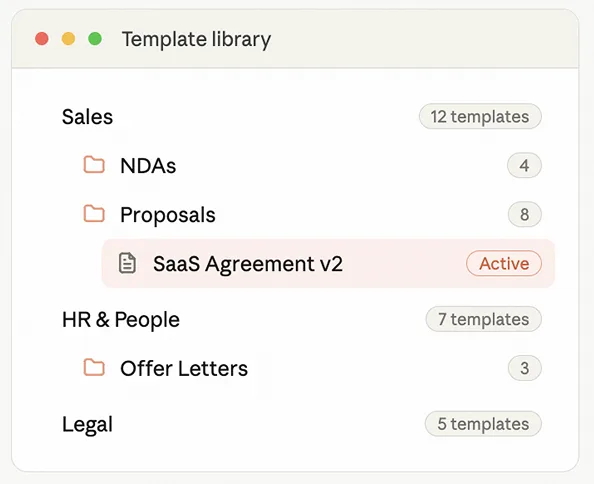
Sort templates by team, document type, or client segment.
Set granular access controls for individual team members.
Share folders with specific users or entire teams instantly.
Create sub-folders for granular organization within large libraries.
Search your entire template library instantly from any screen.
Every setting that goes into a document send can be saved in a template and applied automatically.
Place signature, initials, and date fields exactly where they should appear, every recipient signs in the right place, every time.
Configure the signing sequence in the template, documents execute in the correct order automatically on every use.
Embed your internal approval chain into the template, every send triggers the same review process consistently.
Define signer roles (e.g. Client, Witness, Authorizing Manager) and simply assign contacts at send time, no reconfiguration needed.
Set OTP, Passcode, or standard authentication in the template, security applied consistently to every document sent from it.
Configure reminder frequency in the template, every document sent automatically follows up with signers on your schedule.
Add text fields, checkboxes, and data input fields to collect information from signers during the signing process.
Define how long a signing window stays open, documents sent from the template expire automatically if not signed in time.
Turn any template into an online form so a signer types their details in a web page, then goes straight to signing. See [web forms](/features/web-forms/).
A signing template is a pre-configured document saved in Inkfree with signature fields, signing order, approval workflows, authentication settings, and reminder schedules already set up, ready to send correctly in seconds.
Yes. Upload any PDF or Word document and configure it as a template in Inkfree, placing signature fields, setting routing, and saving authentication preferences exactly as needed.
Yes. Templates can be shared with specific team members or made accessible to your entire organization through Inkfree's folder sharing controls.
Yes. Multi-step approval chains are saved directly in templates so every document sent from that template automatically triggers the same internal review process.
Yes. Any saved Inkfree template can be selected as the document basis for a Bulk Send campaign, with all fields, routing, and authentication settings applied to every recipient's copy.
Yes. Updating a template only affects future sends. Documents already sent remain exactly as they were configured at the time of sending.
Yes. The full signing order configuration, including all stages and signer assignments, is saved as part of the template and applied automatically on every future use.
Inkfree Templates turn your most-used documents into instant, correctly configured, professionally formatted sends, every time, without the setup, without the errors, and without the variation between team members.

